Best fit
For B2B service businesses where work moves across sales, delivery, operations, approvals, and multiple systems — and standard CRM configuration no longer gives teams enough visibility, control, or traceability.

Product case · Profitec Operations CRM
Profitec Operations CRM is a configurable operations layer for businesses whose lead routing, delivery handoffs, approval rules, and exception handling no longer fit inside a standard CRM configuration alone. It combines CRM records with controlled workflow execution, human review, and retained operational evidence before sensitive actions move forward.
The operating problem
Leads, tasks, and approvals live in disconnected systems. When automation exists, it tends to fire without validation or a human checkpoint — so no one can answer the only questions that matter in operations: what did the system do, on what evidence, and who approved it?
Adding AI on top makes it worse, not better. Confident-looking output starts acting on records with no threshold, no review, and no trail. The result is faster mistakes and a process nobody can inspect after the fact.
Where it fits
Best fit
For B2B service businesses where work moves across sales, delivery, operations, approvals, and multiple systems — and standard CRM configuration no longer gives teams enough visibility, control, or traceability.
Not the default
This is not a replacement for a standard CRM when processes are simple, handoffs are limited, and native CRM workflows already provide the control the team needs.
The system
The CRM is built from a small set of primitives. Records and tasks hold the state; pipelines move it; workflow runs execute it; and the review queue, approvals, and audit trail keep that execution under human control.
01
People, companies, and leads as structured records — the operational entities every workflow reads and writes.
02
Discrete units of work with owners, due dates, and state. Created by people or by a workflow run.
03
Configurable stages that move records through a defined process, with the stage logic owned by the team — not hard-coded.
04
Each automated execution captured as an inspectable run: its trigger, steps, evidence, and outcome.
05
Where runs that fall below a confidence threshold wait for a person, instead of acting on a guess.
06
Explicit human sign-off gates in front of customer-facing actions, each tied to an approval reference.
07
A per-run evidence record — what the system did, on what basis, who reviewed or approved it, and when.
Product proof
Every screen below is the live, read-only demo. The data is synthetic, but the surfaces — the command center, the review queue, the workflow runs, the run inspector, and the approval gate — are the real product.
01 · Operations Command Center
One operational view across the work
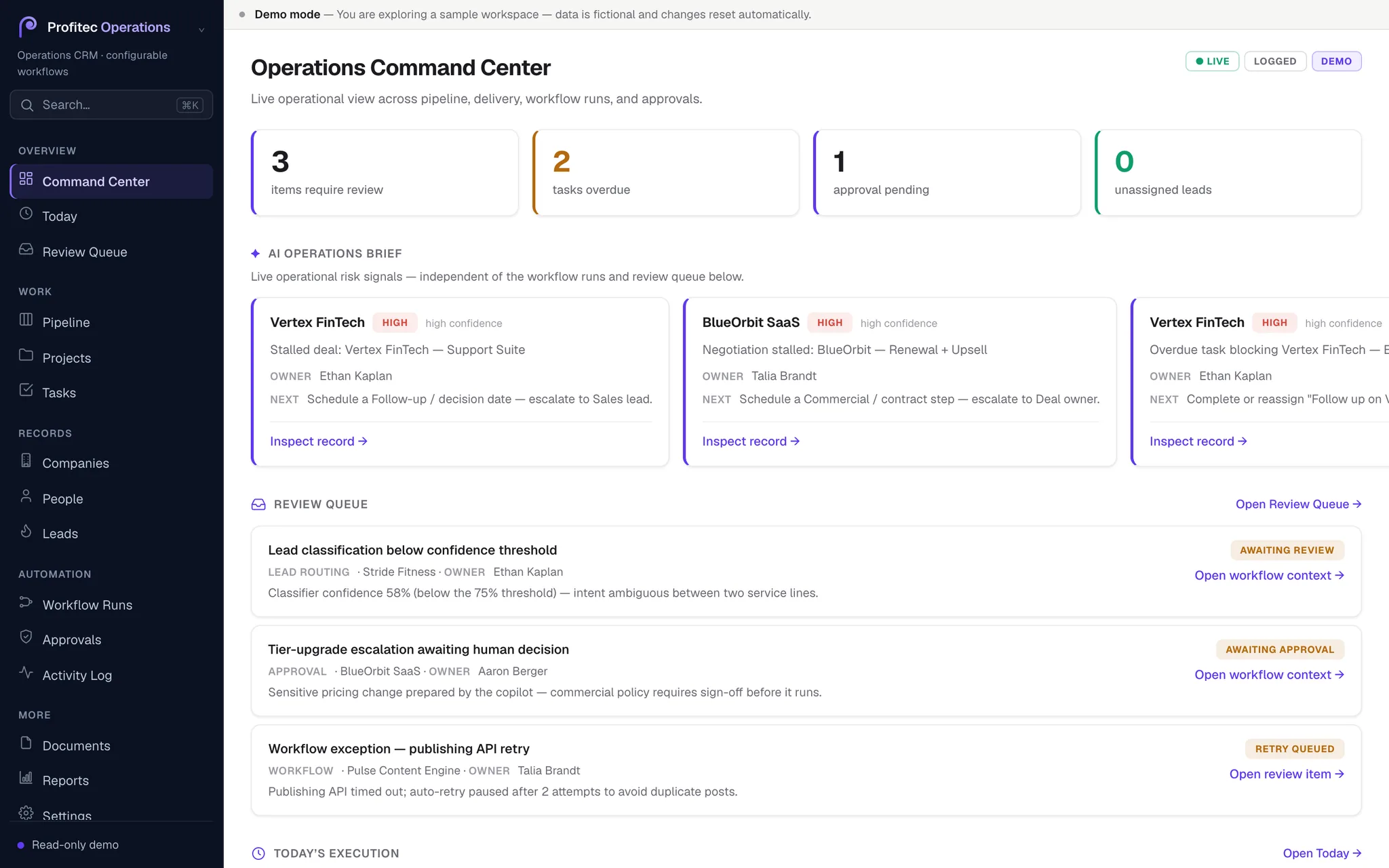
A decision strip, an AI operations brief, and a review-queue preview — read-only signals across pipeline, delivery, runs, and approvals, with no fire-and-forget actions on the surface.
02 · Review Queue
Low-confidence work waits for a person
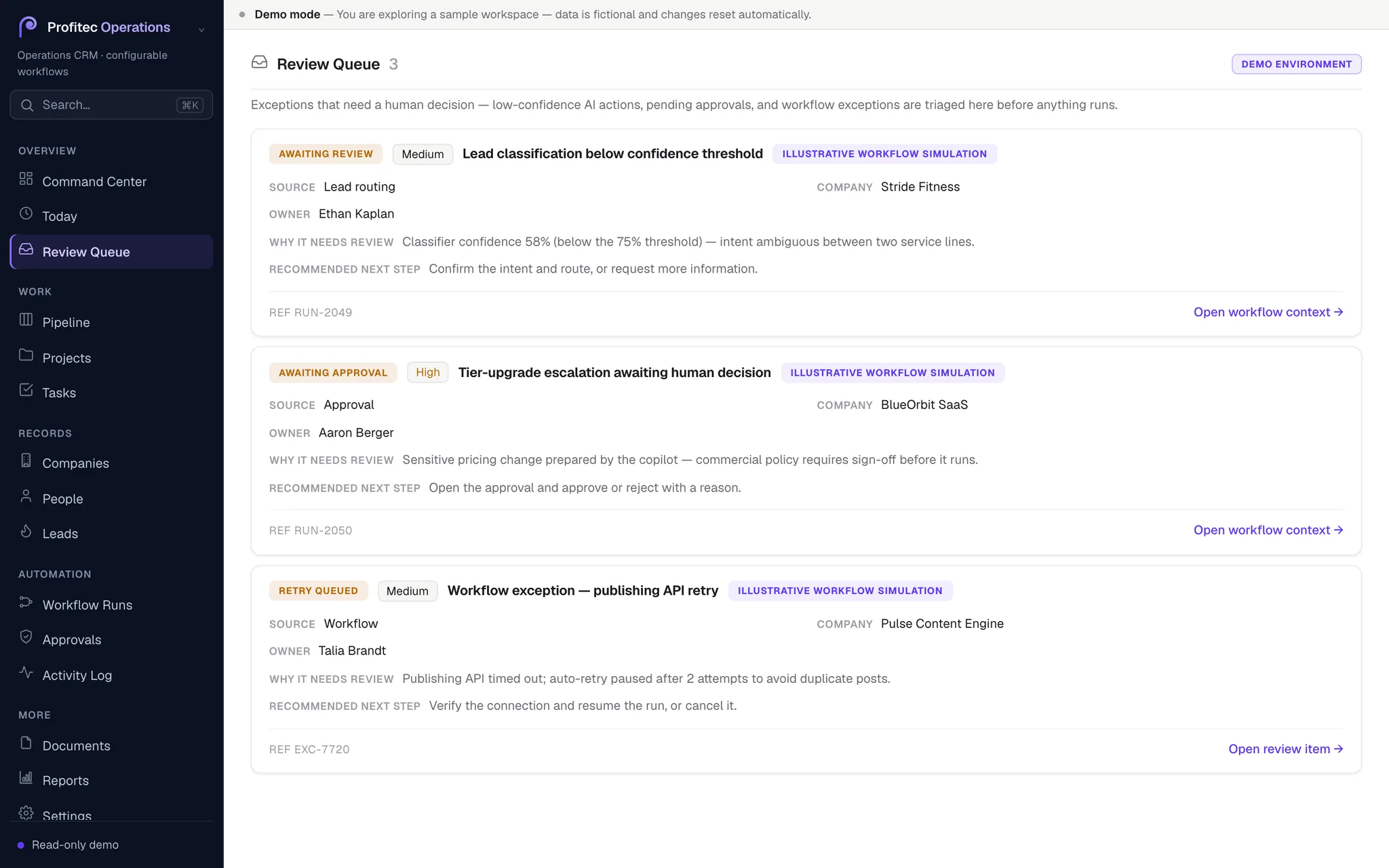
When a run lands below the configured confidence threshold, it is routed here with its reason and a link back to the workflow context — the system asks rather than assumes.
03 · Workflow Runs
Every execution is a run you can open
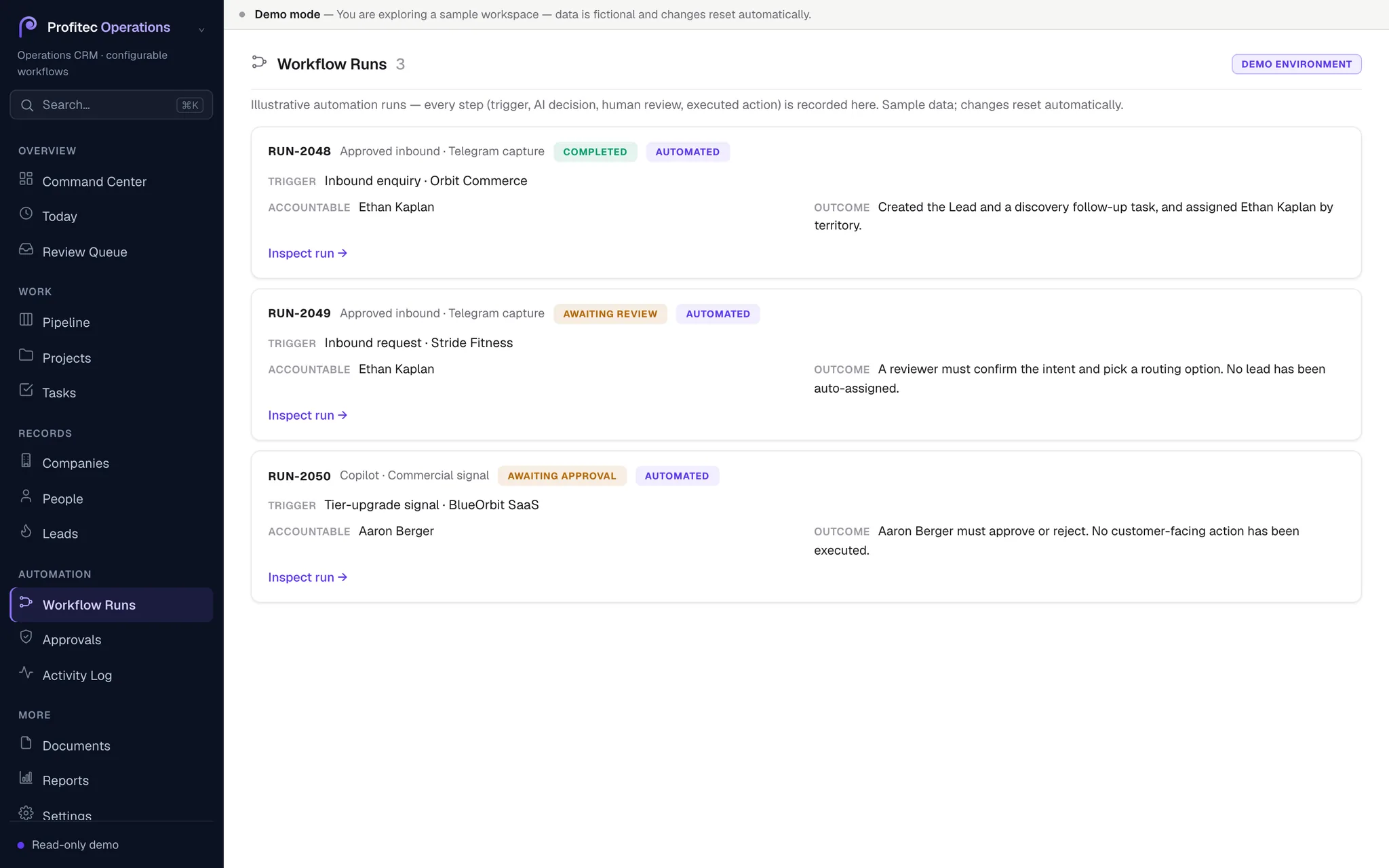
Each automated execution is recorded as a discrete run with its trigger, owner, status, and confidence — not a silent background job.
04 · Workflow Run Inspector
The step-by-step trace behind a run
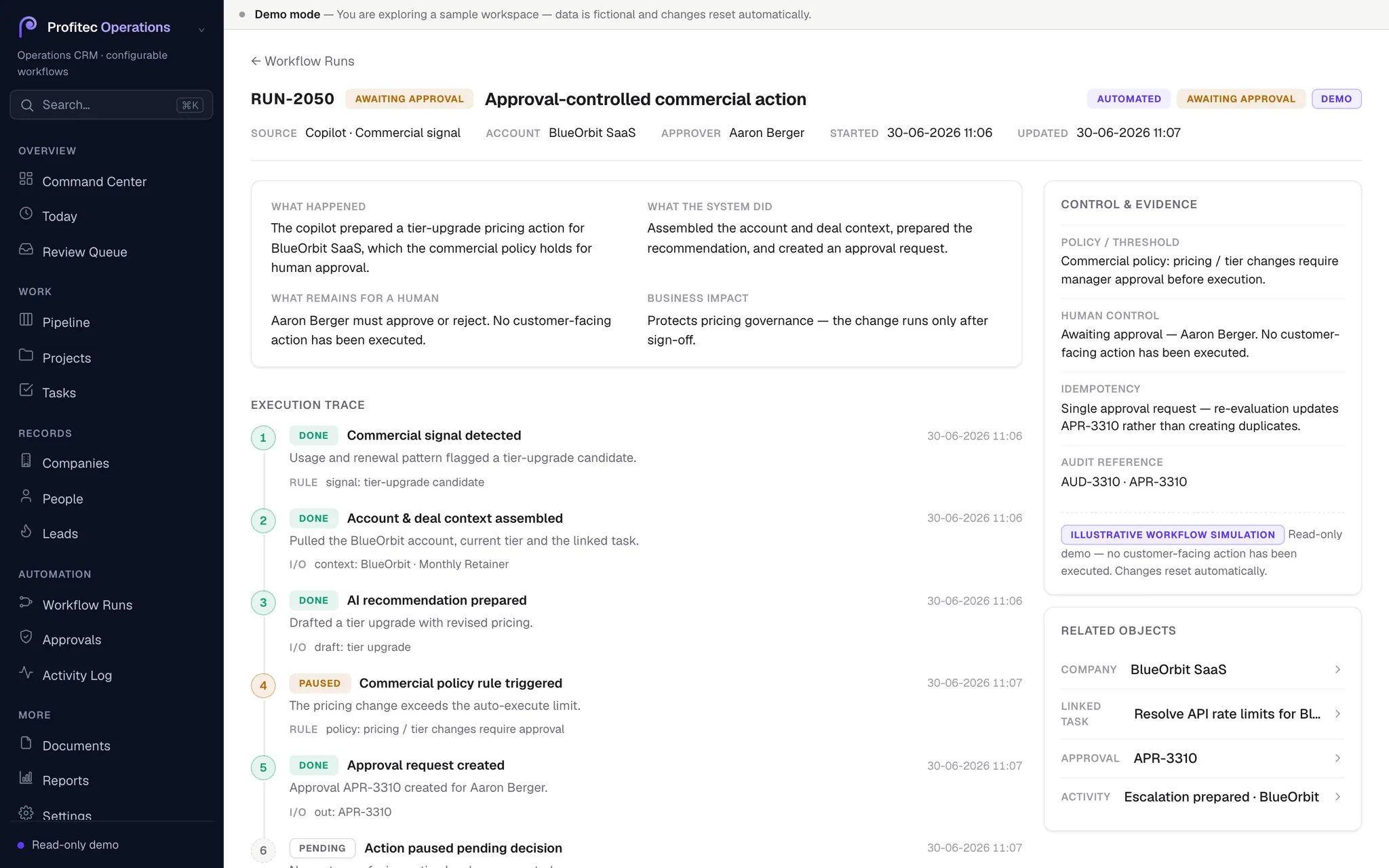
Inside a run: the execution trace, the policy or confidence rule that gated it, the evidence, and the outcome — including where a human still has to act.
05 · Approval-controlled action
Customer-facing actions need sign-off
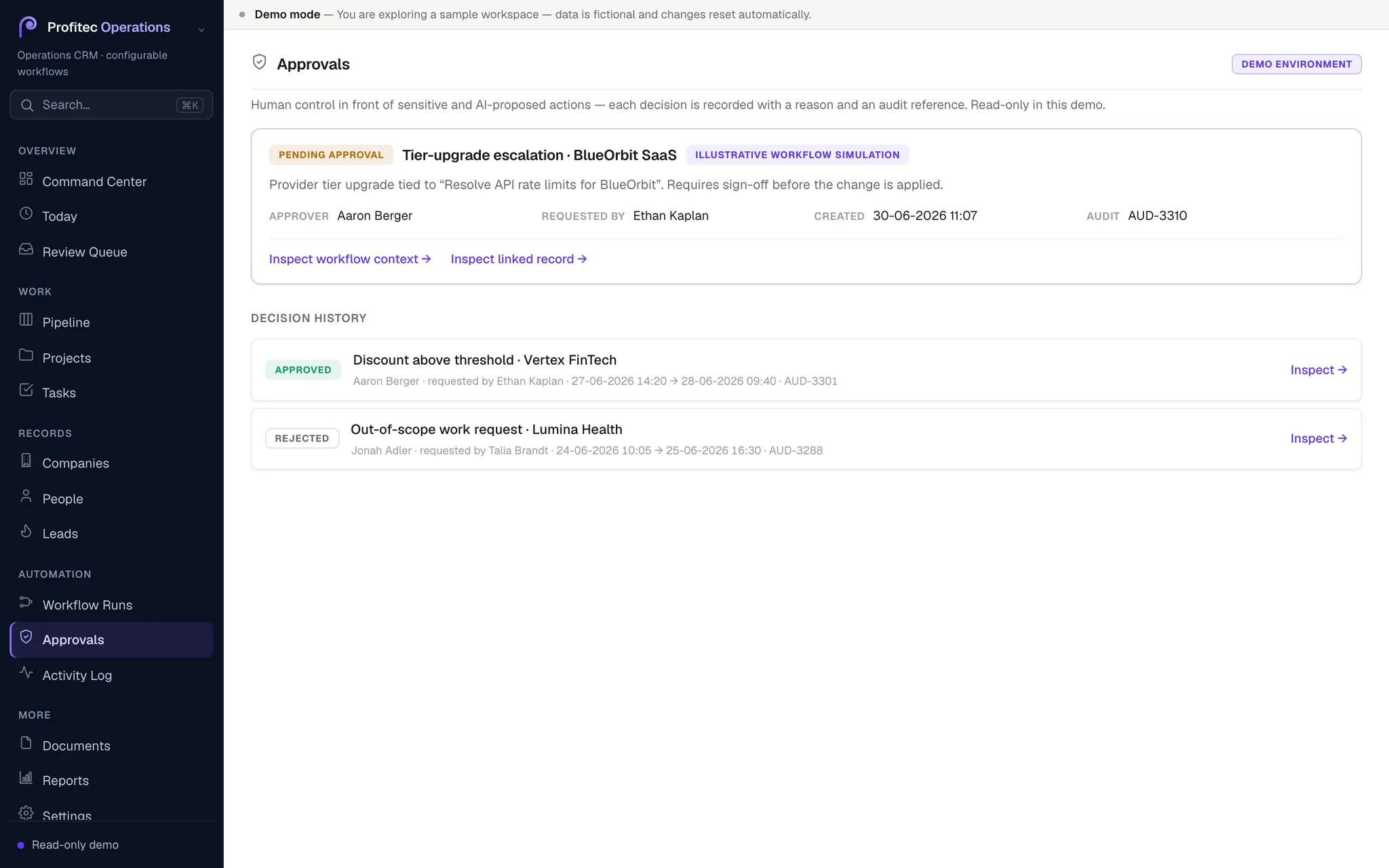
Before a customer-facing action executes, it stops at an approval gate with its approval and audit references — the action is proposed, not performed, until a person signs off.
Screenshots captured from the interactive demo. The demo is read-only and uses synthetic data; names, companies, and figures are illustrative and do not represent real customers.
CRM vs. operations layer
A standard CRM is often the right starting point for a structured sales process.
A tailored operations system becomes relevant when lead routing, delivery handoffs, approval rules, AI-assisted decisions, and evidence need to move across multiple teams and tools — under one controlled operating model.
| Dimension | Standard CRM configuration | Profitec Operations CRM |
|---|---|---|
| Primary role | Stores and manages customer, pipeline, and activity data | Connects records to controlled operational execution |
| Automation | Supports configured workflows and follow-up automation | Adds validation, routing logic, review thresholds, approvals, and run-level evidence where the process requires them |
| AI-assisted work | Can support AI features and assisted actions | Applies confidence and policy rules before sensitive actions proceed |
| Human control | Defined through CRM permissions, workflows, and process design | Explicit review queues and approval gates are built into the execution model |
| Auditability | Activity history and reporting | Per-run evidence showing trigger, inputs, decision logic, reviewer, action, and outcome |
| Best fit | Standardised sales and relationship processes | Multi-team operations with complex handoffs, exceptions, approvals, and workflow dependencies |
Controlled automation
Automation is not a black box. Every run follows the same sequence, and a human can stop it at the review and approval steps before anything customer-facing happens.
A record event, a schedule, or an inbound message starts a workflow run.
Inputs are checked against rules before anything downstream executes.
The model classifies and routes the record, attaching a confidence score.
A configured threshold decides: proceed automatically, or escalate.
Below the threshold, the run waits in the review queue for a person.
Customer-facing actions pass through an approval gate before they execute.
The run is recorded end to end — basis, decision, reviewer, and outcome.
Configuration
The execution model is fixed; the policy is yours. These are the parts a team configures to match how it actually operates.
Questions
If leads, delivery work, approvals, or AI-assisted decisions move across CRM, inboxes, spreadsheets, and multiple tools, start with the workflow — not a generic software template. We map how work moves today, identify where automation is safe, define where human review is required, and design the right operational system around it.
Tell us where work gets stuck. We will start with the operating process, not a pre-packaged CRM.